The Birdie interface
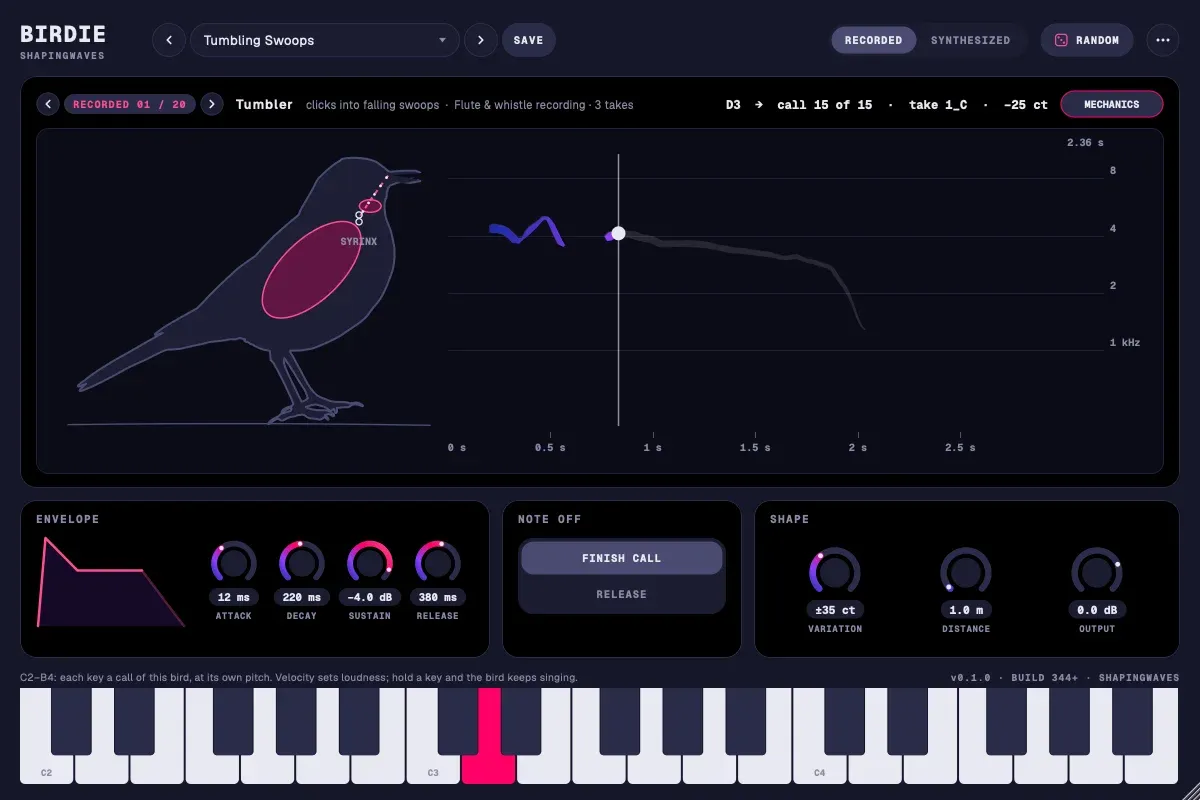
The Birdie window has five regions, from top to bottom. You can resize the window by dragging its corner: it keeps its shape and scales from 60% up to 200% of its normal size.
Header
Section titled “Header”Across the top of the window:
- BIRDIE / SHAPINGWAVES on the left.
- The preset bar: arrows to step through presets, the preset’s name (click it for the preset menu) and a SAVE button. A small dot next to the name, and a lit SAVE button, tell you that you have changed the sound since the preset was loaded. See Presets.
- The RECORDED / SYNTHESIZED switch chooses the bank of birds.
- RANDOM (with a die) picks a random bird from the current bank.
- The ⋯ button opens a small menu: show or hide the bird’s inner workings, show your presets folder in Finder, and the version and credits.
Call card
Section titled “Call card”The large card in the middle shows the bird you are playing.
- Its top row shows the bird’s number in its bank (for example RECORDED 03 / 20) with arrows on either side to step to the previous or next bird. Click the number, or the bird’s name, for a menu of all 38 birds.
- Next to it are the bird’s name, a few words about its sound, and where it comes from (for example “Flute & whistle recording” or “Synthesized”).
- On the right, a line tells you what you played last: the key, which call it was, and the random pitch offset it got. Before you play, it says how many calls the bird has. While a recorded bird is loading, it says “loading the recordings…”.
- MECHANICS shows or hides the bird’s air sacs, syrinx and airflow in the picture.
The stage
Section titled “The stage”Most of the call card is the stage: a drawing of the bird whose beak, air sacs and airflow move with the sound. The call it sings is drawn as a ribbon that follows its pitch, thicker when louder, with a playhead moving along it.
Control cards
Section titled “Control cards”Below the call card sit three cards with the sound controls:
- ENVELOPE: a picture of the envelope and the knobs ATTACK, DECAY, SUSTAIN and RELEASE.
- NOTE OFF: what happens when you let go of a key, FINISH CALL or RELEASE.
- SHAPE: VARIATION, DISTANCE and OUTPUT.
Every control is explained on Controls.
Keyboard
Section titled “Keyboard”At the bottom is a keyboard from C2 to B4, the 36 keys that each play a call of the bird. Click a key to hear it. The keys light up when Birdie receives notes from your DAW or MIDI keyboard. Above the keyboard, a short hint line reminds you how the keys work, and the version number is shown on the right.